

Introduction
This article will discuss the various identities that a UE is assigned and how the network uses these identifiers. I will cover the following identifiers
- Subscriber Identities (IMSI/SUPI/SUCI/GUTI/TMSI)
- Device Identities (IMEI/PEI)
SUPI/SUCI
One of the changes 5G introduced was the introduction of the Concealed Identity or the SUCI. In previous generations of cellular technology, the subscriber’s identity was passed over the air, making it vulnerable to intercept or man-in-the-middle attacks. The IMSI or SUPI, as it is known in 5G, is only known on the UE’s SIM card and in the 5GC and is not passed over the air.


Profile A SUCI using Open5GS and UERANSIM
Open5GS udm.yaml has instructions on generating the private and public keys for Profile A and Profile. Since UERANSIM is only capable of Profile A, that will be the key pair we use for our configuration.

Generate Private and Public keys for Open5GS and UERANSIM using the instructions from udm.yaml

edit UERANSIM/config/open5gs-ue.yaml with appropriate identity information. The UE authentication keys are in another field and must match what is in the 5GC subscriber database.

Start the 5GC, the UERANSIM gNB, then the UERANSIM UE – the output of the UE should be similar to the screen shot below.

Since UERANSIM logging is minimal (limited to what you see in the console), I collected a pcap from the 5GC to confirm that the UE was sending Profile A SUCI value in it’s REGISTRATION REQUEST.

Taking a closer look at the REGISTRATION REQUEST, there is a 5GS mobile identity field with the configured SUCI profile A values.

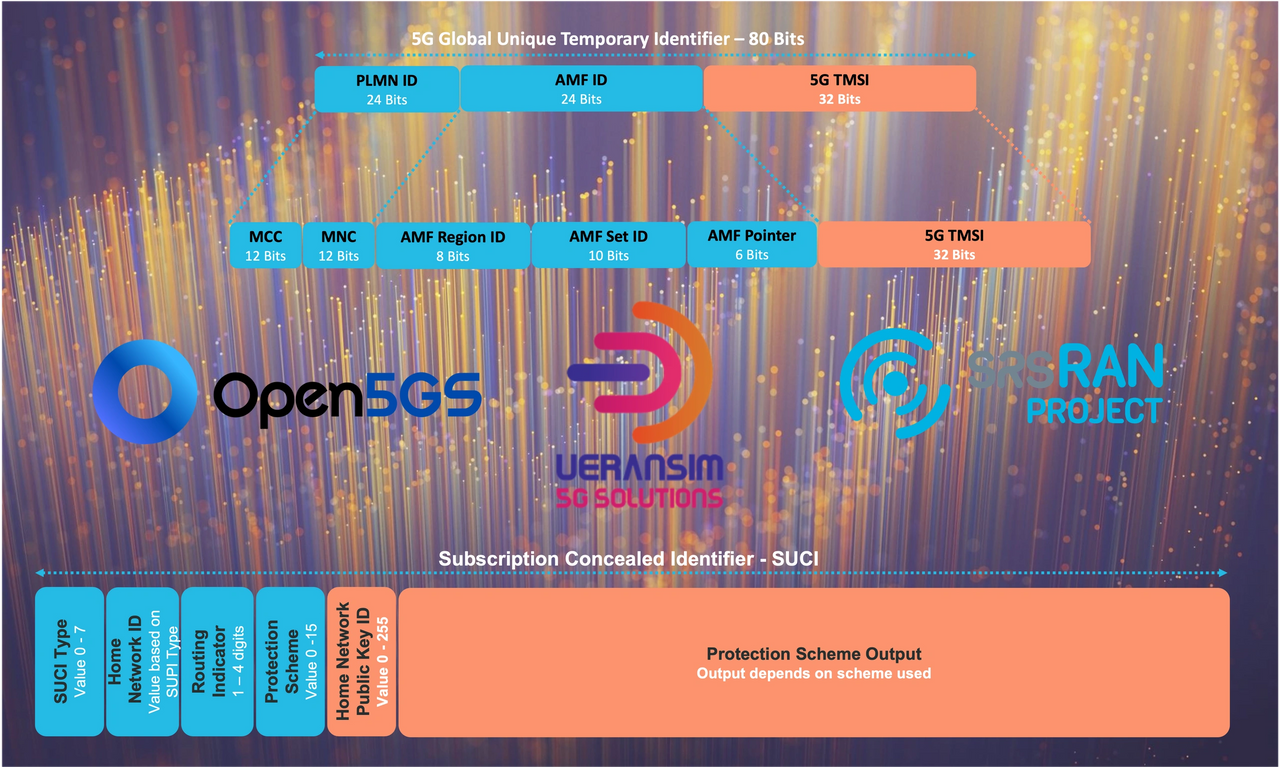
amf.log also shows the SUCI value defined in the graphic at the beginning of this post.
suci type – home network id – routing indicator – protection scheme – home network public key id – protection scheme output

AMF then forwards the SUCI to the AUSF and UDM to be matched with the appropriate SUPI in the subscriber database.


UDM can retrieve the SUPI value that matches the SUCI.

UDM sends the SUPI back to the AUSF, which is then forwarded to the AMF, which is mapped with a GUTI value.

AMF sends the GUTI in the REGISTRATION ACCEPT message to the UE. The SUPI is never passed over the air.

UE then responds with the REGISTRATION COMPLETE message.

Now the 5GC knows the UE with that specific GUTI is registered with the network, when the UE sends a subsequent Registration Request within the Registered AMF area, the 5GC will be able to map the GUTI with the SUPI.
Once the UE Registers with a new AMF using its previously assigned GUTI, the 5GC will not be able to map the GUTI to the SUPI, and the 5GC will initiate the IDENTITY REQUEST procedure.
Null SUCI
A null SUCI is currently the 3rd variation and is traditionally just the IMSI value without encryption. You can see the SUCI in the amf.log below – it originally came to the AMF broken down by each SUCI discriminator, but with the protection scheme = 0, the AMF knows that the SUCI is NULL and does not need UDM to match to SUPI value.

GUTI/TMSI
The UE will use the GUTI in Registration events and will pass it’s 5G-TMSI in SERVICE REQUEST messages and respond to pages from the network by its 5G-TMSI.

In this example, the AMF receives a GUTI from the UE that does map to a SUPI/IMSI in the 5GC, so the AMF initiates the IDENTITY REQUEST procedure.

The AMF generates a new GUTI that maps to the SUPI/IMSI and sends the updated GUTI in the REGISTRATION ACCEPT message.

IMEI/PEI
The IMEI or Permanent Equipment Identity (PEI) defines the hardware or device that the subscriber is using. This identity can be used to look up device details such as make, model, RAT support, Band support, operating system, chipset, etc. The network uses this identity to query the EIR to ensure that the handset is not restricted from network access for various reasons.
During the NAS SECURITY MODE procedure, the network requests that the subscriber sends its IMEISV (with software version).

UE responds in the NAS SECURITY MODE RESPONSE with its IMEISV. At this point, NAS messages are Ciphered and integrity-protected, which only allows Authenticated networks to access it.

Using the IMEI, you can use various open-source websites to see device information.


Leave a Reply to Sergio PadovaniCancel reply